
Clarity Documentation
Embank Clarity is a Jira Cloud Forge app that automatically evaluates ticket quality using AI and enforces quality standards through graduated blocking, feedback, and templating.
Embank Clarity creates a quality gate without friction. Teams get:
- Clear feedback on why a ticket isn’t ready
- Guided improvements through structured comments
- Flexibility to override with justification when necessary
- Visibility into quality trends via private analytics
- Control via role-based admin settings
The graduated blocking approach (hard block → warning → silent pass) balances enforcement with pragmatism—critical gaps stop work, minor gaps warn, and good work goes silently forward.
Key Capabilities
1. Quality Review & Scoring (0-10 Scale)
- Evaluates ticket summaries and descriptions against quality criteria
- Posts actionable review comments with structured feedback
- Uses configurable LLM providers (OpenAI, Anthropic, AWS Bedrock)
Clarity Documentation
Embank Clarity is a Jira Cloud Forge app that automatically evaluates ticket quality using AI and enforces quality standards through graduated blocking, feedback, and templating.
Embank Clarity creates a quality gate without friction. Teams get:
- Clear feedback on why a ticket isn’t ready
- Guided improvements through structured comments
- Flexibility to override with justification when necessary
- Visibility into quality trends via private analytics
- Control via role-based admin settings
The graduated blocking approach (hard block → warning → silent pass) balances enforcement with pragmatism—critical gaps stop work, minor gaps warn, and good work goes silently forward.
2. Graduated Blocking System
Three tiers of enforcement visible in the configuration:
- Red Zone (≤4): Hard block—tickets cannot proceed without override
- Amber Zone (5-7): Warning—tickets can proceed but with caution notice
- Green Zone (≥8): Silent pass—no comments posted
The screenshots show this system in action:
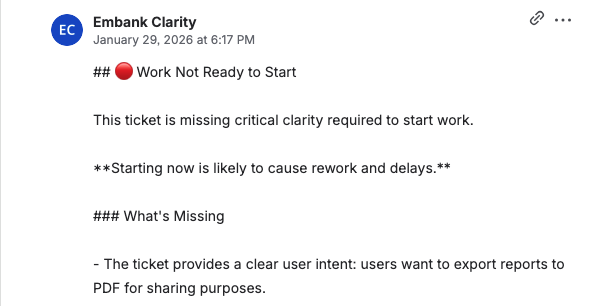
- A score of 4/10 triggers a hard block with the message “Action needed—this ticket may cause work”
- Users see specific improvement areas (user intent clarity, action clarity, dependencies, done signal)
- Overrides require justification and are logged for audit trails
3. Flexible Review Rules
Admin configuration includes:
- Issue types: Epic, Story, Task, Bug, Improvement (all checked in example)
- Status gates: Triggers at Backlog, Refinement, To Do, In Progress, In Review, Done
- Commitment transitions: Blocks tickets moving to “In Progress” or similar commitment statuses if quality is insufficient
- Cooldown: 1-minute default prevents review spam on rapid updates
- Positive feedback: Optional toggle to praise high-quality tickets (8+)
4. LLM Configuration
- Provider selection: OpenAI (ChatGPT shown), Anthropic, or AWS Bedrock
- Model selection: gpt-4o in example, with fallback guidance (gpt-4o-mini noted as typical)
- Secure API key storage with update capability
5. Project Scoping
- Comma-separated project keys (e.g., “SCRUM”) limit which projects receive reviews
- Enables targeted rollout and prevents org-wide disruption
6. Licensing & Analytics
- License status display (Active/Inactive)
- License type: Development or Marketplace
- Billing managed through Atlassian Marketplace
- Private analytics support for tracking quality trends
.
User Experience in Jira
Blocking Behavior
The screenshot shows:
- Clear risk indicators with emoji (🔴 RED for high risk)
- Explicit statement of risk level
- Instructions to “confirm or clarify expected behavior or explicitly accept the risk”
Feedback Structure
Review comments follow a standardized format:
- What’s Good: Highlights existing strengths (clear summary, acceptance criteria listed)
- To Improve: Specific gaps identified (missing user story format, vague action steps, undocumented dependencies, lack of done signal)
Override Workflow
- Users can override red-zone blocks by clicking “Unblock Ticket” action
- Justification required: “risk acceptable, lets test it”
- Logged with user attribution (@kieran in example)
- Bypass status shown in subsequent comments: “⚠️ Clarity Block Overridden”
Configuration Highlights
From the settings screenshots:
| Setting | Value | Purpose |
|---|---|---|
| Minimum Score Threshold | 8 | Comments posted only below this (unless positive feedback enabled) |
| Green Zone | 8-10 | Silent pass |
| Amber Zone | 5-7 | Warning; proceed allowed |
| Cooldown | 1 minute | Max one auto-review per issue per window |
| Backlog Treat as backlog-like | ✓ | “To Do” statuses treated as backlog when not in sprint |
| Blocking on Commitment | ✓ | Hard block on transitions to “In Progress” |
Security & Data Handling
- Encrypted API key storage in Forge app storage
- Issue properties for idempotency and spam suppression
- Audit logging for overrides
- Analytics aggregate-oriented (avoids PII exposure)